This is the first article written for this site rather than linked from somewhere else, so it seems fair to start with the site itself: what it is made of, how a Markdown file becomes a page at melihucar.com, and what I deliberately left out.
The short version
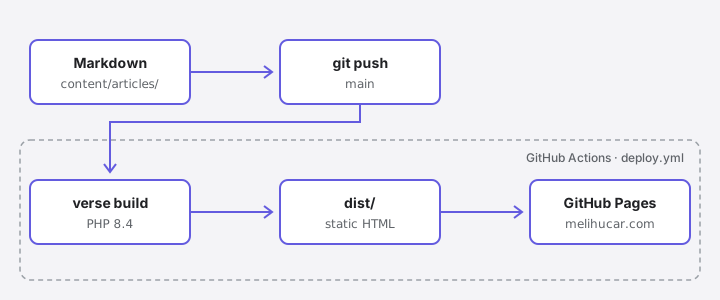
Every page here is a Markdown file in a Git repository. When I push to main, a GitHub Actions workflow builds the site with Verse and publishes the result to GitHub Pages. There is no server, no database, and no admin panel.
Content is just files
The repository is small enough to describe in full:
verse.yaml
content/
  about.md
  projects.md
  articles/
    how-this-site-is-built/
      page.md
      pipeline.svg
.github/workflows/deploy.yml
verse.yaml holds the site-wide settings: title, URL, description, and social links. Everything else is content. An article is either a single Markdown file or, like this one, a folder with a page.md and the assets it uses. Keeping the diagram next to the text means I can move or rename the article without hunting down broken image paths.
Each file starts with a little front matter:
---
title: How This Site Is Built
description: Markdown files, a small PHP static site generator, and one GitHub Actions workflow.
date: 2026-10-21
tags: [Verse, AstroPHP, GitHub Pages, Static Sites]
---
Some articles here live on Medium. For those, the front matter has an external_url and the article list links straight to it. Writing a page natively or pointing to it elsewhere is one line of difference. From now on, this site is where articles are published first; Medium is there for reach.
Why Verse
Verse is a static site generator I'm building under AstroPHP. I spend most of my time in PHP and Laravel, and I wanted the tool behind my own writing to live in the same ecosystem: templates are Blade, content is Markdown, and the output is plain HTML.
The other reason is simpler: building things is fun, and it teaches you more than using them. Writing a static site generator means deciding how Markdown becomes HTML, how links between pages resolve, and what a build should refuse to publish. Those are small questions, but answering them yourself is a good way to learn.
The whole deploy pipeline
This is the entire workflow:
name: deploy

on:
  push:
    branches: [main]
  workflow_dispatch:

permissions:
  contents: read
  pages: write
  id-token: write

jobs:
  build:
    runs-on: ubuntu-latest
    steps:
      - uses: actions/checkout@v7

      - uses: shivammathur/setup-php@v2
        with:
          php-version: '8.4'
          extensions: intl, mbstring

      - name: Install Verse
        run: |
          composer global require astrophp/verse --no-interaction
          echo "$(composer global config bin-dir --absolute --quiet)" >> "$GITHUB_PATH"

      - run: verse build

      - uses: actions/upload-pages-artifact@v5
        with:
          path: dist

  deploy:
    needs: build
    runs-on: ubuntu-latest
    environment:
      name: github-pages
    steps:
      - uses: actions/deploy-pages@v5
The build job installs PHP, installs Verse with Composer, and runs verse build, which writes the finished site to dist/. That folder is uploaded as a Pages artifact, and the deploy job publishes it. Nothing is committed back to the repository; there is no gh-pages branch to keep in sync.
The permissions block is worth a note. pages: write and id-token: write are what let deploy-pages publish without a personal access token stored in secrets.
Writing locally
Locally, the loop is two commands:
verse serve
verse check
verse serve previews the site and rebuilds on every save. verse check validates the site without writing anything, which is a quick sanity pass before pushing. Articles marked draft: true show up in the preview with a badge but are never part of a real build, so unfinished work can sit in the repository safely.
What I left out
I want this site to stay slim: HTML and CSS first, everything else only when it earns its place.
- Comments. They would mean a third-party script or a server, and neither fits a site that is just files. If something here is worth discussing, I'd rather hear about it on LinkedIn or in a GitHub issue.
- A JavaScript framework. JavaScript is used only where a feature needs it, such as the copy button on code blocks.
Note
A newsletter is planned for a future release. Until then, LinkedIn and GitHub are the best places to follow along.
What comes next
The articles here will mostly be about software architecture, AI systems, and the Laravel ecosystem: following a problem from the first question to the decisions that remain. This one had a second job too. It is the first page to go through the entire pipeline above, so if you're reading it at melihucar.com, that part works.